How to Make Your Home Smart with a WiFi Switch and a USB C Wall Socket
Updated 22 October 2026
You can make your home smart by replacing two things on the wall: the light switch and the charging socket. A WiFi switch lets you control lights from your phone or by voice with Alexa, and a USB C wall socket with WiFi charges phones at up to 20W and works with Alexa and Google Assistant.
Step 1: Check your wall box for a neutral wire
Before you buy anything, look at the wiring in the wall box. The smart WiFi switch works either way. With a neutral wire, you connect the live line to L, the neutral line to N, and the wire that goes to the light (the control line) to L1. Without a neutral wire, a small capacitance part is wired in alongside the live and control lines, as shown on the right of the diagram below.

The USB C wall socket wires to live, neutral and earth, so it needs a neutral wire. Switch the power off at the breaker before you open a wall box, and use a qualified electrician if you are not sure what you are looking at.
Step 2: Connect your phone to 2.4GHz WiFi
The switch pairs on a 2.4GHz WiFi network. 5GHz networks are not supported during pairing. Connect your phone to the 2.4GHz network before you start.
Step 3: Pair the switch in the app
Download the Smart Life or Graffiti app, open it, and add a device. Follow the prompts in the app to put the switch into pairing mode and add it to your account.

Once it is paired, you can use Alexa to switch it by voice, for example "Alexa, turn on the living room lights."
Step 4: Set the features that make it useful
The app has four settings worth five minutes of your time.
- Schedules and timers: turn lights on or off at set times.
- Power off memory: choose how the switch restarts after a power cut.
- Backlight: turn the LED backlight on the touch panel on or off.
- Two way control: link two switches so both operate the same light, which suits stairs and hallways. In the app, open Multi control (also called Link with Switch) and group the two switches.
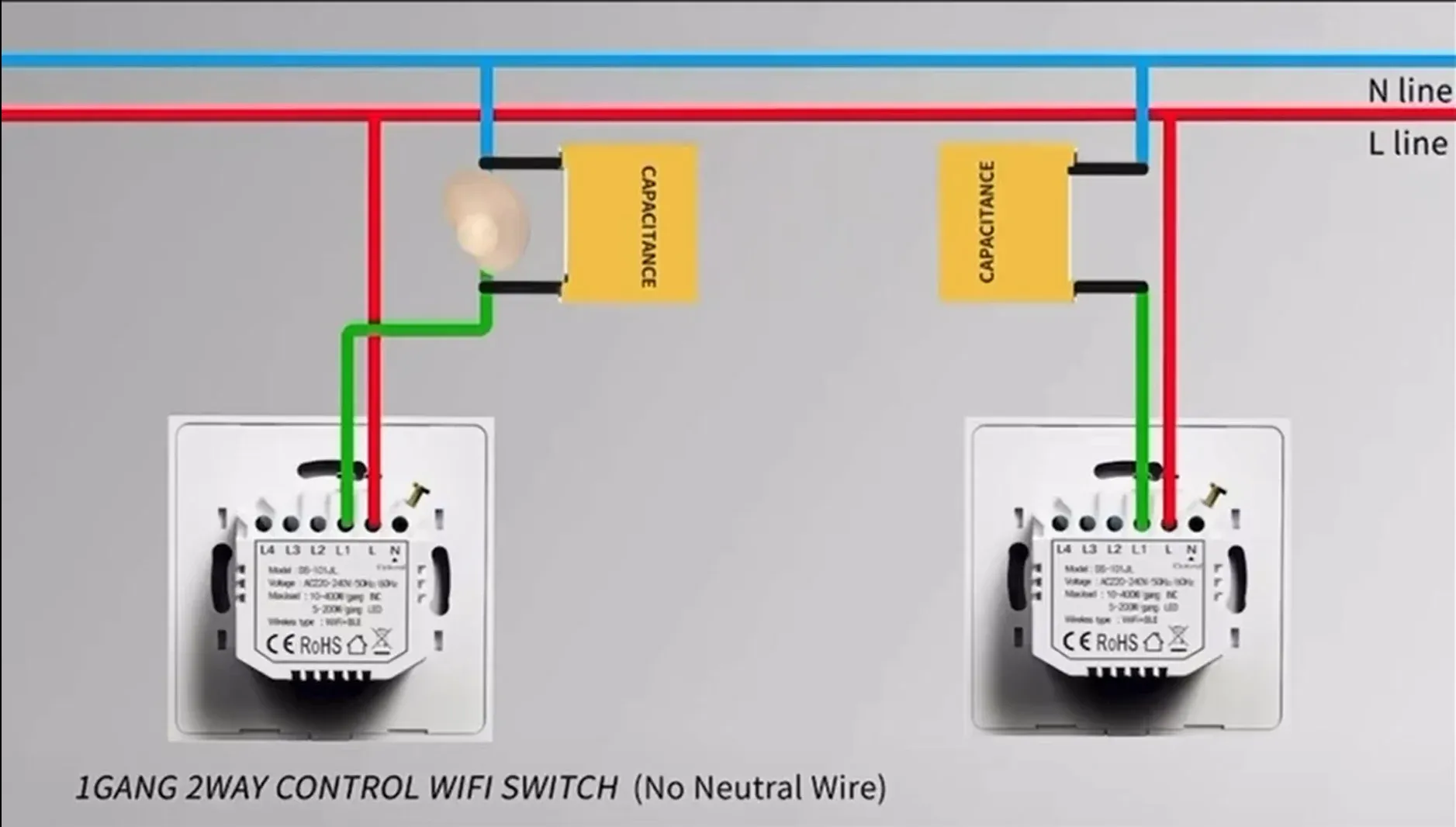
Two way control also works where there is a neutral wire. The diagram above shows the version without one.
Step 5: Add the USB C wall socket
The smart WiFi double wall socket puts two multi sockets and two USB ports in one plate. The multi sockets take UK, EU, US, AU, JP and South African plugs. The USB A port supports QC 3.0, and the USB C port supports PD 20W fast charging. When both USB ports are in use, they share 5V 3A in total. Each socket has its own touch button with a light ring, and the socket works with Alexa and Google Assistant.
Which rooms to start with
- Bedroom: the USB C socket beside the bed, with a lamp on one socket and a phone on USB C.
- Staircase and hallway: two switches linked for two way control.
- Living room: a switch with a schedule that turns the lights on in the evening.
- Home office: the socket on the desk wall, for a laptop charger, a monitor and a phone.
- Majlis and guest rooms: the socket on the seating wall, since the multi sockets take guests' chargers from most countries.

Common questions
Does a smart WiFi switch work without a neutral wire?
Yes. Without a neutral wire, a small capacitance part is wired in alongside the live and control lines. The switch itself is the same.
Why won't my smart switch connect to WiFi?
Check that your phone is on a 2.4GHz network. The switch does not support 5GHz networks during pairing.
What happens to the light after a power cut?
The app has a power off memory setting, which lets you choose how the switch restarts after the power comes back.
Can two switches control one light?
Yes. Wire them for two way control, then link them in the app under Multi control (also called Link with Switch). It works with or without a neutral wire.
How many watts can a smart switch handle?
Each switch button handles up to 200W of LED lighting or up to 400W of incandescent lighting.
Can I control the lights by voice?
Yes. The switch works with Alexa, so you can say "Alexa, turn on the living room lights." The socket works with Alexa and Google Assistant.